Design Lab I
Updated: Oct 25, 2025
University of Connecticut, Storrs, CT
Fall 2025 - Present
Average of 20 students per section

Instruct students in foundational design principles through project-based pedagogy that integrates Photoshop workflows with critical and creative practice. Emphasize visual research, observation, storytelling, and the ethical integration of AI, while foregrounding inclusive imagery, typography, color theory, and compositional strategies to support learning outcomes and the development of professional, portfolio-ready work.
Design Lab 1 is a foundational studio course exploring the principles of digital media design through the creation, manipulation, and reception of digital images. This course introduces students to essential design principles, including typography, composition, color theory, and visual storytelling, through hands-on, project-based learning. Working primarily in Adobe Photoshop, students will develop strategies to observe, interpret, represent, and imagine visual information. The course also introduces students to emerging workflows using AI as a creative tool in ideation and design development. Through lectures, discussions, projects, and critiques, students will develop critical skills in visual design, media literacy, and ethical considerations of digital image-making.

Creating a social media campaign
Course Overview
15-week schedule
Design Lectures + Photoshop Workshop
Weekly Exercise + 4 semester projects
Practicing Documentation & Professional Presentations
Week 1: Intro to Design Thinking + Photoshop Basics
Weeks 2–3: Project 1 — Design Research
Weeks 4–6: Project 2 — Design as Self-Observation
Weeks 7–9: Project 3 — Design for Multi-Platform Campaign
Weeks 10–15: Project 4 — Design as Storytelling


Designing a graphic poster

Menu Poster Design + Mockup
Course Agenda
Week 1: Introduction & Design Thinking
• Course overview, syllabus, expectations
• Lecture: What is Design? Why Design Matters, Foundational Design Principles
• Demo: Interface, layers, image editing fundamentals
• Exercise: “Visual Identity Card”
Week 2: Foundations of Design & Photoshop Basics
• Lecture: Core design principles — balance, contrast, hierarchy, rhythm, alignment, proximity
• Demo: Interface, layers, image editing fundamentals
• Exercise: Simple composition studies (using shape, contrast, and alignment)
• Introduce Project 1: Design Research
Week 3: Composition & Research Presentations
• Demo: Shape tool, selection tool, layer mask
• Exercise: Create 3–5 layout variations demonstrating design principles
• Project 1 Presentations: Design Research (students share findings + visual analysis)
• Introduce Project 2: Design as Observation
Week 4: Expressive Typography
• Lecture: Anatomy of type, hierarchy, typographic systems, type as image
• Demo: Type tool, warping, text effects, and layout grids
• Exercise: Text manipulation with effects, Recreate a movie title with expressive type
• Begin Project 2 production
Week 5: Color Psychology & Visual Harmony
• Lecture: Color theory, emotional tone, and palette creation
• Demo: Blending modes, gradient maps, and color adjustments
• Exercise: Create a mood board + color palette around a keyword
• Continue Project 2 (Visual Identity Collage)
Week 6: Hierarchy & Layout Systems Visual Storytelling & Semiotics
• Lecture: Grid systems and type hierarchy in poster and digital design
• Demo: Vector drawing techniques and precision layouts
• Exercise: Re-design a Poster for Impact – focus on visual hierarchy and dynamic composition
• Project 2 Presentations + written critique
Week 7: Intro to Social Campaign Design
• Lecture: Communicating message and brand identity through design
• Discussion: Audience, tone of voice, and visual consistency
• Introduce Project 3: Multi-Platform Campaign Design
• Demo: Poster layout & mock-up creation (smart objects)
Week 8: Design with AI Tools
• Lecture: AI in the Design Process — ideation, generation, ethics, authorship
• Demo: Adobe Firefly, Canva Magic Studio, ChatGPT for creative ideation
• Exercise: Explore AI tools for ideating visuals and refining in Photoshop
• Class Discussion: AI ethics in design – authorship, bias, transparency, and responsibility
Week 9: Advanced Compositing & Feedback
• Lecture/Demo: Filters, effects, and stylization for cohesive visuals
• One-on-One Check-ins: Progress report and feedback on Project 3
• Exercise: Dissect and analyze inspirational campaign work
• Project 3 Presentations + written critique
Week 10: Visual Storytelling & Semiotics
• Lecture: Narrative design, symbolism, audience perception
• Demo: Image correction, tone, and atmosphere (photo retouching, smart objects)
• Exercise: Manipulate a photo to evoke a specific emotion or story
Week 11: Motion & Animated Visuals
• Lecture: Visual storytelling through motion
• Demo: Frame-by-frame animation in Photoshop
• Exercise: Create short looping motion piece
• Introduce Project 4: Design as Storytelling — animated poster / visual narrative
Week 12: Professional Identity & Portfolio Design
• Lecture: Designing Your Professional Presence – portfolio websites, personal branding, and media representation
• Demo: Setting up a simple portfolio site (Adobe Portfolio, Behance, or Wix)
• Exercise: Select and refine works for online presentation + draft artist/designer statement
Week 13: Refinement & Professional Presentation
• Lecture: Compiling process documentation and presentation boards
• Demo: Exporting GIFs, preparing files for print and web
• Exercise: Portfolio Curation + Storytelling Rationale – final edits of Project 4 and portfolio layout
• One-on-one feedback on final presentation prep
Week 14: Thanksgiving Break / Student Work Week
• independent studio time for Project 4 completion and portfolio refinement
Week 15: Final Presentation & Course Reflection
• Project 4 Presentations + portfolio showcase
• Final written reflection and documentation submission
• Group critique and discussion: growth, future directions, industry applications

Creating a social media campaign + mockup


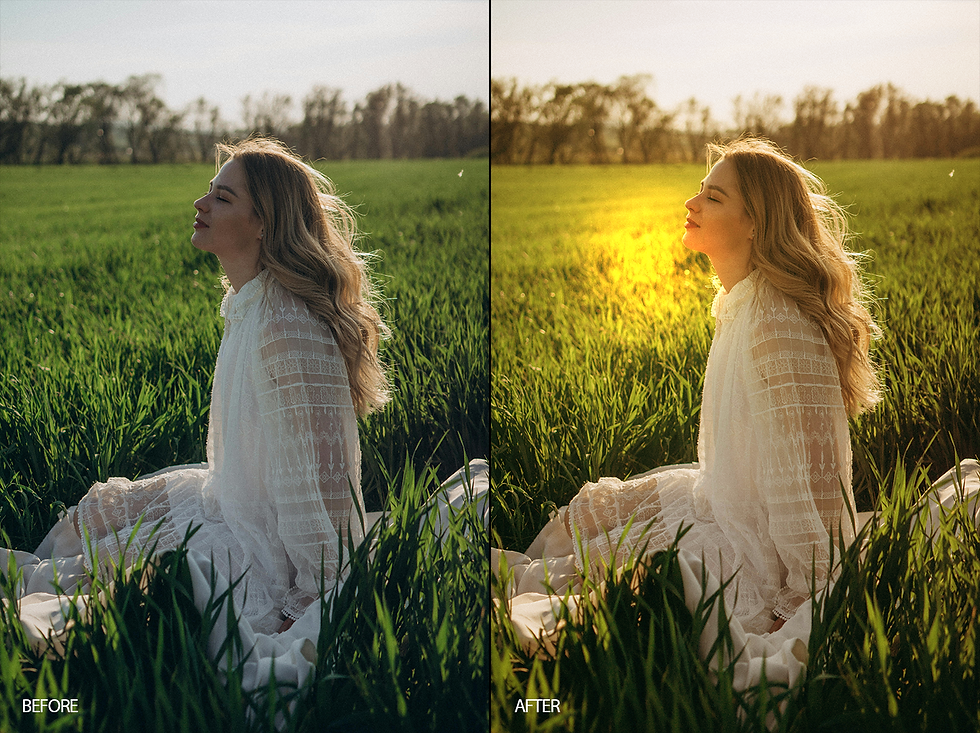
Working with adjustment layers


Comments